
Computer mein hum jo bhi photo, video ya document save karte hain, wo kisi na kisi unit mein measure ki jati hai. Jaise hum doodh ko Litre mein aur kapde ko Metre mein naapte hain, thik waise hi computer data ko memory units of computer mein naapa jata hai.
Types of Memory Units
Computer memory mainly do types ki hoti hai: Primary aur Secondary. Inhe measure karne ke liye hum binary digits ($0$ aur $1$) ka istemal karte hain.
- Bit (Binary Digit): Ye sabse choti unit hai. Isme ya toh $0$ hota hai ya $1$.
- Byte: $8$ Bits milkar $1$ Byte banate hain.
- KB, MB, GB, TB: Ye badi units hain jinme hum rozana data measure karte hain.
Computer Memory Units Chart (Ascending Order)
Exams mein aksar pucha jata hai ki units ko memory units in ascending order (chote se bada) mein lagaiye. Niche diya gaya chart aapki bahut madad karega:
| Unit | Short Name | Equivalent To |
| Bit | b | 0 or 1 |
| Nibble | – | 4 Bits |
| Byte | B | 8 Bits |
| Kilobyte | KB | 1024 Bytes |
| Megabyte | MB | 1024 KB |
| Gigabyte | GB | 1024 MB |
| Terabyte | TB | 1024 GB |
| Petabyte | PB | 1024 TB |
Two Primary Memory Units
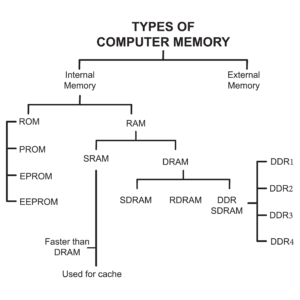
Primary memory (ise main memory bhi kehte hain) computer ka wo hissa hai jo CPU ke direct contact mein rehta hai. Iske two primary memory units niche diye gaye hain:
- RAM (Random Access Memory): Ye ek temporary memory hai. Jab aap computer par kaam kar rahe hote hain, toh data RAM mein hota hai. Computer band hote hi iska data ud jata hai.
- ROM (Read Only Memory): Ye ek permanent memory hai. Isme computer ko start karne wale instructions hote hain. Ise hum sirf read kar sakte hain, change nahi.
Two Secondary Memory Units
Jab humein bahut saara data hamesha ke liye save karna hota hai, tab hum secondary memory units ka use karte hain. Ye sasti hoti hain aur inki capacity bahut zyada hoti hai.
- HDD (Hard Disk Drive): Ye sabse purana aur bharosemand tarika hai bade data ko store karne ka.
- SSD (Solid State Drive): Ye HDD se bahut fast hoti hai aur aajkal ke laptops mein yahi use hoti hai. (Aap Pen Drive ya SD Card ko bhi secondary memory unit maan sakte hain).
Computer Top PDFs (Sarkariexampdf.in Specials)
Aapki taiyari ko boost karne ke liye humne sabhi important topics ke direct PDF links niche diye hain. Inhe click karke aap asani se download kar sakte hain:
- Fundamentals of Computer
- Memory Organisation (Important)
- Components of Computer System
- Computer Hardware Notes
- Database Management System (DBMS)
- Microsoft Office Full Notes
- Computer Abbreviations A-Z
Memory Units 100 MCQs (Practice Set)
Practice ke bina theory bekar hai! Niche kuch sample questions hain, poore 100 memory units MCQs ke liye aap hamara special PDF download karein.
💻 Computer Knowledge Quiz: Memory Units
Smallest units to Big Data units / सबसे छोटी इकाई से लेकर बिग डेटा इकाइयों तक
Conclusion
Doston, memory units ka topic sirf exams ke liye hi nahi, balki general knowledge ke liye bhi zaroori hai. Aaj humne samjha ki computer data ko kaise measure karta hai aur all memory units ka sequence kya hai.
Umeed hai aapko ye jankari pasand aayi hogi. Agar aapko koi bhi doubt ho, toh niche comment box mein zaroor puchein. Sarkariexampdf.in par visit karne ke liye dhanyawad!
FAQs – Memory Units
What are the various units of memory?
Various units of memory mein Bit, Nibble, Byte, Kilobyte (KB), Megabyte (MB), Gigabyte (GB), Terabyte (TB), aur Petabyte (PB) shamil hain.
What are various units of memory?
Ise hum measurement units kehte hain jo data storage capacity batati hain. Iski shuruat ‘Bit’ se hoti hai jo 0 ya 1 ke roop mein hoti hai.
What are the different memory units?
Different memory units ko hum size ke hisaab se baant-te hain. Sabse common units aaj ke time mein MB, GB aur TB hain.
What are its measuring units of memory?
Computer memory ko measure karne ke liye Binary system ka use hota hai. 1024 ka factor in units ko ek dusre se jodta hai (Jaise 1024 KB = 1 MB).
Which are the most commonly used units of memory?
Aajkal sabse zyada use hone wali units GB (Gigabyte) aur TB (Terabyte) hain, kyunki mobile aur computer ki storage isi mein aati hai.
What are the different units of computer memory?
Inhe do categories mein dekha jata hai: Smallest units (Bit, Nibble, Byte) aur Higher units (KB, MB, GB, TB, PB, EB, ZB, YB).
What is primary memory name its two units?
Primary memory wo hai jo computer ke current tasks ko handle karti hai. Iske do main units RAM aur ROM hain.
What is primary memory and secondary memory?
Primary memory (RAM/ROM) fast hoti hai lekin temporary hoti hai. Secondary memory (HDD/SSD/Pen Drive) slow hoti hai lekin permanent storage provide karti hai.
- Difference Between RAM and ROM | 100 MCQs Practice

- Memory Units of Computer: Chart, Types aur 100 Important MCQs PDF
- Output Devices of Computer: List, Examples and 100 MCQs
- Computer Input Devices: Definition, Examples aur 100+ MCQs
- Computer Basics Mcqs for Government Exams Notes+100 MCQs



Exam Expert & Content Strategist with over 5+ years of experience in the competitive exam sector. I specialize in analyzing government recruitment patterns and simplifying complex syllabi for aspirants. Having helped thousands of students through Sarkari Exam PDF, my mission is to provide authentic, updated, and high-quality study materials for SSC, UPSC, Railways, and Banking exams to help every candidate achieve their career goals.
⚠️ Disclaimer: All study materials, notes, and PDFs shared on SarkariExamPDF.in are provided purely for educational and reference purposes to assist competitive exam aspirants. We do not claim ownership of any original books or official publications. If you are the rightful copyright owner and have any objection regarding any material, please contact us through our Contact Page for immediate removal.